Focus on the conversation.
Let AI handle the notes.

AI Meeting Notes with live transcriptions and intelligent summaries during calls - stay fully present, never miss critical details.

For professionals who conduct client calls, contract discussions, and critical meetings on web platforms.

12,000 credits included. €100. One time payment.

Call Copilot - Live Transcription

Hard to focus on the conversation AND take notes.

Important details mentioned while you're thinking about the previous point. You're trying to write notes while actively listening. Can't interrupt to ask them to repeat. You miss critical information because you can't do both.

Your client data stored on someone else's servers.

Cloud storage means compliance concerns for sensitive projects. NDA meetings? Client calls? Everything uploaded to third-party servers. You're not even sure yourself where the data goes.

"AI Notetaker has joined the meeting?"

Visible bots make things awkward. Clients ask questions, breaking flow. You're explaining your AI notetaker instead of focusing on the conversation. You look less professional, not more.

€10/month. €120/year. Forever.

Subscriptions add up. You're paying monthly for features built for enterprise teams - CRM integrations, team dashboards, analytics you'll never use. The costs never stop.

Sound familiar?

You can't stay engaged AND capture every detail. So you either miss information or lose presence.

What if AI handled notes while you focus 100% on the conversation?

Live transcription captures everything. AI summaries generate in real-time. All stored locally. No bot joins. One-time payment.

Real-Time Transcription & AI Chat

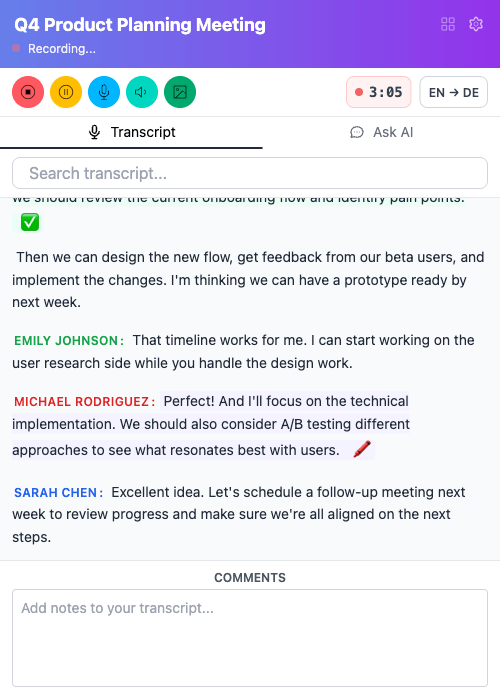
Live transcription as they speak. Mark key moments with callouts, action items, and highlights. Chat with your transcript during the call - ask questions, get summaries, clarify points instantly.

No bot joins your meeting. Invisible to participants. Direct audio capture from browser tab. Professional image maintained.

Organize & Review Your Meetings

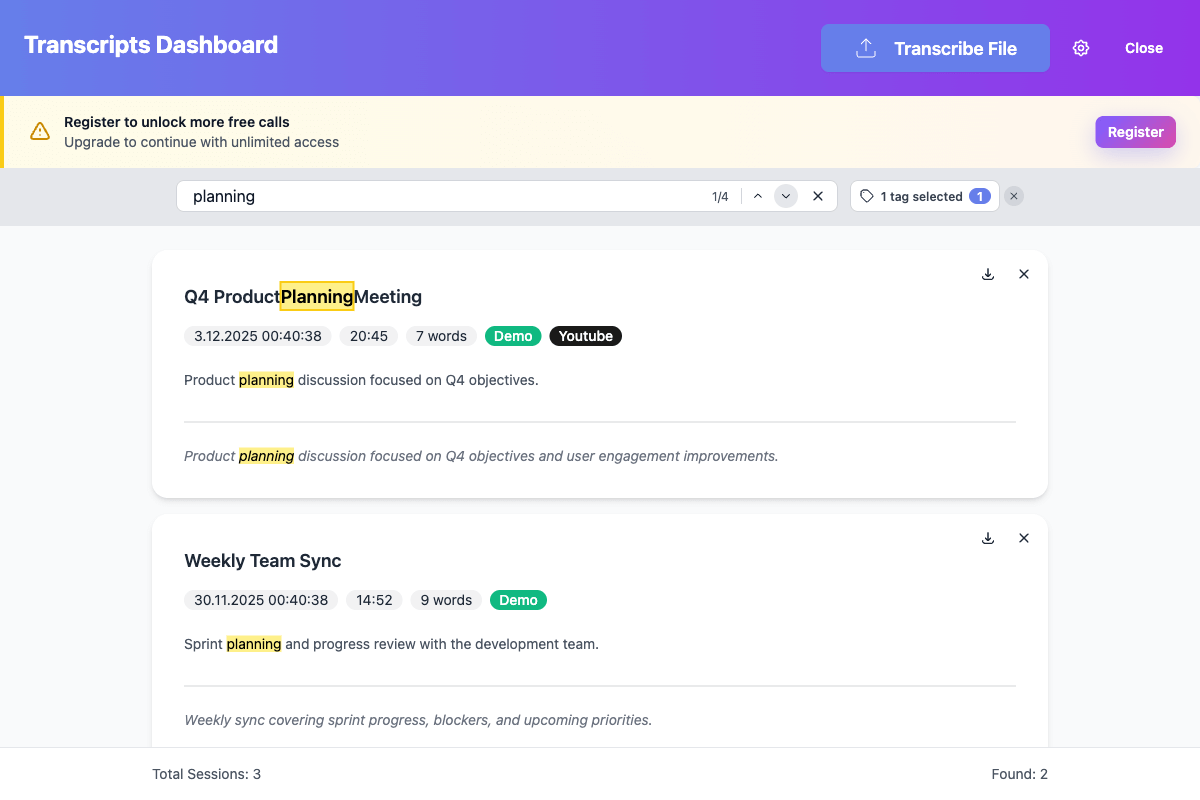
Dashboard: Search across all transcripts. Filter by tags. Find any meeting instantly.

Transcript Viewer: Edit speaker names. Generate AI summaries with preset prompts - action items, key decisions, daily standups. Chat with any past meeting.

Stored on

Your Device
Not Cloud

100% Private - NDA-Safe

All data stays on your device. Safe for NDA meetings, sensitive discussions.

You control your AI: Choose between cloud AI (powerful, modern models) or local AI (100% on-device with Chrome's built-in Gemini Nano). Switch anytime. Your data, your choice.

Finance, healthcare, legal - all protected. Delete anytime. Full privacy control.

Pay Once, Use Forever

12,000 credits included. Competitors: €10-20/month. Payback in 5-10 months, then free forever.

Includes: All updates, unlimited local AI. No API keys required.

€100
One Time
12,000 Credits

vs. €120-240/year for competitors

How It Works

1

Install Extension

One click in Chrome Web Store. No account required to start. Unlimited first calls for free.

2

Start in Seconds

Install the extension and start recording. Your plan includes credits for transcription and optional Cloud AI — no API keys needed.

3

Start Recording

Works with Meet, Zoom, Teams, and anything on web. Completely invisible. Real-time transcription begins instantly. Stay focused on the conversation - no bot joins.

4

Stay 100% Present

Read live transcript as they speak. Get real-time AI summaries. Ask questions without interrupting. Everything captured automatically while you stay fully engaged in the conversation.

Let AI handle the notes while you focus 100% on the conversation.

What you get:

  • Stay 100% present - live transcription and summaries during every call
  • Invisible recording - no bot joins your meetings
  • Complete privacy - all data stays on your device, NDA-safe
  • 12,000 credits included - never expire, use at your own pace
  • One-time payment option - stop paying monthly forever

One-Time Payment - €100

12,000 credits included (never expire)
Live transcription & Cloud AI summaries
Unlimited storage forever
All future app updates included
Complete privacy and control

Add to Chrome - Free unlimited first calls!

1 credit = $0.01. Use for transcription (1 credit/min) and AI usage.

Or choose monthly (cancel anytime):

€10/month - 1000 credits included

Credits are spent on transcription (1 credit/min) and Cloud AI usage. Credits accumulate monthly, unused credits lost on cancellation.

Free Trial: 4 calls free, no credit card required

Free authenticated users get ~30¢ Cloud AI allowance - enough for 4 multi-hour calls with AI summaries.
Works with Google Meet, Zoom, Teams, and anything on web • Chrome 138+

Frequently Asked Questions

What technology powers Call Copilot?

Call Copilot uses Deepgram API for high-quality transcription. For AI summaries and chat, you choose between Cloud AI (powerful models like Qwen via OpenRouter) or Local AI (Chrome's built-in Gemini Nano - zero data leaves your computer). All transcripts are stored locally using IndexedDB, giving you complete control.

What's the difference between Local AI and Cloud AI?

Local AI (Gemini Nano): Runs entirely on your device. Zero data leaves your computer - perfect for NDA meetings and maximum privacy. Requires Chrome 138+ with specific flags. Has smaller context window (4K tokens) and has lower quality ans speed than cloud models.

Cloud AI (Default): Uses GDPR-friendly cloud providers with Zero-Data-Retention (ZDR) (no logging / no training). We default to open-source Qwen models in the following fall back order: Qwen3 235B A22B Instruct 2507, Qwen3 Next 80B A3B Thinking, Qwen3 Coder 30B A3B Instruct, Qwen3 Coder 480B A35B when needed via OpenRouter.

Switch between them anytime in Settings. Your choice, your data, your control.

What are the limitations?

  • • Local AI requires Chrome 138+ with specific flags enabled
  • • Local AI has smaller context window than cloud models
  • • No automatic speaker identification by names - just Speaker 1 and Speaker 2
  • • No cloud sync or team collaboration features
  • • Works only in browser-based meetings (not native apps)

Why not just use Deepgram directly?

You'd lose the entire UI we've built: live transcription view, summaries, chat interface, screenshot tagging. No real-time assistance during meetings. No local storage and search across all your calls. No speaker re-identification or transcript editing. No future updates and improvements we're constantly shipping. You'd need to build your own integration from scratch.

How accurate is the transcription?

Real-time transcription: Good for most use cases, may have minor errors with accents/technical terms. Deepgram post-processing: Professional-grade quality. You can re-transcribe any recording for higher accuracy. Edit transcripts manually for perfect accuracy when needed.

Is this legal? Can I record without telling people?

Recording laws vary by location - you are responsible for compliance. Some jurisdictions require all-party consent, others only one-party. Call Copilot is a tool; you must ensure legal use in your context. Not suitable if you need documented consent for recordings.

What about privacy and security?

All audio and transcripts stored locally on your device only. Deepgram processes audio for transcription but doesn't store it. For AI features: Local AI keeps everything on-device; Cloud AI uses ZDR-compliant models (no data retention). You control your data completely - delete anytime. For more details, see our Privacy Policy.

How does the credit system work?

Simple pricing: 1 credit = $0.01

  • Transcription: 1 credit per minute
  • Cloud AI: Varies by model (cost in $ converted to credits)

Monthly plan (€10/month): 1000 credits included. Credits accumulate monthly, unused credits lost on cancellation.

One-time payment (€100): 12,000 credits that never expire - use at your own pace.

Free users: Get 4 free calls with AI summaries included. Local AI (Gemini Nano) is always free and unlimited.